إنشاء الحساب
مساعدة تسجيل الدخول وإنشاء الحساب
اتبع هذه الخطوات لإنشاء وتفعيل حساب جديد في البوابة.
1
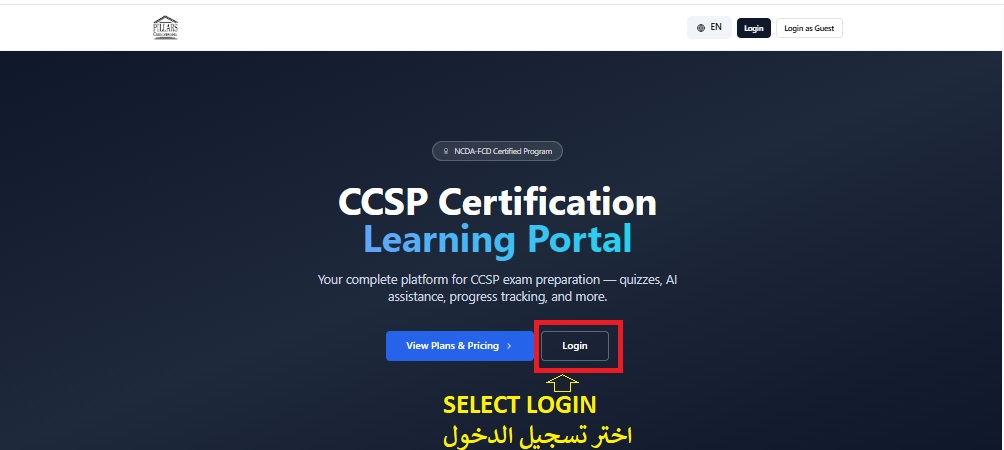
حدد الدخول إلى البوابة
From the portal homepage, click on Portal Login.
2
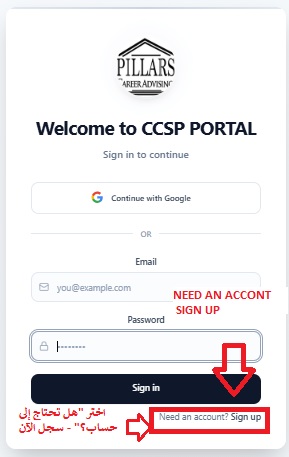
ثم حدد أحتاج إلى حساب
Click on I need an account to start registration.
3
أدخل بريدك الإلكتروني وكلمة مرور البوابة
Enter your email and a strong portal password. Confirm the password by typing it twice.

4
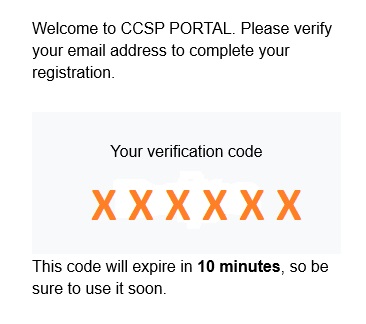
سيرسل لك الموقع رمزًا لمرة واحدة
A one-time verification code will be sent to your registered email.
5
يرجى مراجعة بريدك الإلكتروني للحصول على رمز التحقق
Check your inbox, copy the 6-digit code, and enter it in the portal to activate your account.
